Use CelestKin without an account. Keep everything when you make one.
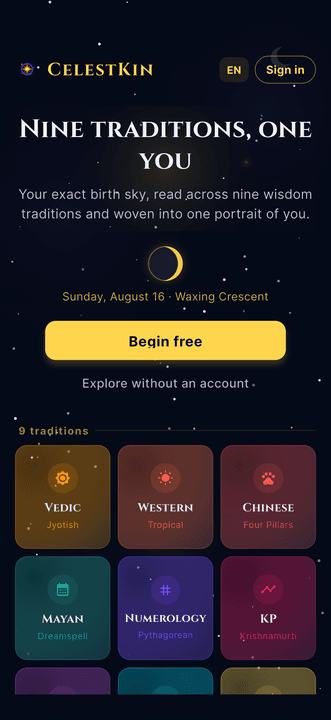
Yes, you can use CelestKin without an account. A guest account is a private account with no email or password, which the app creates when you tap Explore without an account. It opens your Daily Edition, your portrait and the ask box; tools, reading history, full charts and extra profiles wait until you add an email.
Most astrology apps put a registration wall between you and your own birth chart. CelestKin does the opposite: open the app, enter your birth details, and read. No email, no password, no card. An account exists for exactly one reason, keeping what is yours safe, and you decide when that reason matters.
What can you do in CelestKin without signing in?
Without signing in you get your personal Daily Edition, built from your birth date, time and place rather than your sun sign, on the Explore tab where the app opens, plus the Today screen and its ask box under More. Tap Explore without an account on the welcome screen, enter those birth details, and the edition is ready to read.
Guests also receive a small welcome grant of credits, sized so you can put a real question to the ask box. It is tied to your device, one grant per phone, ever, so clearing the cache or reinstalling does not mint new free credits. That protection is what lets us be generous with everyone once. The guest grant is smaller than the one an email sign-up gets; the one-time bonus for converting later makes up the difference, so neither route ends up ahead.
Where a guest account stops
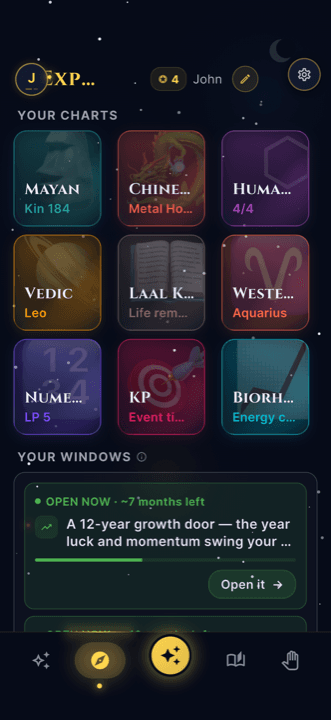
A guest account covers one person: you. Guests carry exactly one birth profile, their own, and can edit it but not add a second, so compatibility matches and charts for a partner or a child wait for an account. The same goes for the quick tools, your reading history, the full chart screens behind the nine tiles, the insight catalogue and in-app purchases. Each of those still shows on screen; tapping one opens a short prompt to create a free account instead.
A guest account also has one weak point: with no email attached, there is nothing to recover it with. Supabase, the service behind CelestKin's sign-in, documents that an anonymous user cannot get back into the account after signing out, clearing browsing data or moving to another device. A lost phone or a wiped app therefore leaves a guest's readings out of reach, which is the whole case for adding an email.
What happens to your readings when you sign up?
Your readings stay exactly where they are when you sign up, because signing up adds an email to the account you already have instead of creating a new one. As a guest you already have a real, private account under the hood; it just has no email attached. When you sign up, CelestKin attaches your email to that same account. Your profile, your portrait, your readings, your conversation, your remaining credits: all of it simply becomes permanent and synced. There is no migration step, no "import your data", no risk of loss, and you receive a small one-time credit bonus for making it official.
Signing up in the app asks for an email address and a password, then sends a confirmation link; the address becomes active once you tap it. Until then you keep using the app as before.
The merge runs in both directions: profiles already in the cloud come down to your device, and any profile you created while signed out is pushed up to the account, automatically, on the first sign-in. You never re-enter a birth date you already typed.
One case works differently. If you already have a CelestKin account and choose Sign in to existing instead of creating a new one, your birth profiles move over and merge, but the guest session's readings and credits stay behind. The app lays out both choices in a dialog before you pick, with Create account (keeps everything) as the other option.
Why sign up at all? Because purchases, reading history across devices, and deeper tools attach to something recoverable. If you lose your phone, an email gets everything back; an anonymous session cannot promise that.
And if you want to leave, you leave completely
Deletion works for everyone, including guests, and for guests it is the shortest path in the app: tap the gear icon at the top right, open Delete Account and hold the button for three seconds. No password exists, so none is asked for. An export link sits right there if you want your data first, and your data leaves our servers on the schedule described in our Privacy Policy. The text of the readings the app saves to your account is encrypted on our servers, we never sell data, and there are no ads. The door out is as real as the door in.
By default a deletion waits 30 days, with your data hidden in the meantime, and a single checkbox deletes it immediately instead. A guest cannot cancel it, though: confirming the deletion signs the guest session out, and a guest has no email or password to sign back in with. Guests get the same path because Google Play requires any app that lets people create an account to offer an in-app way to delete it and its data, and a guest account is still an account.
Start as a guest
Tap Explore without an account, enter your birth details and read today's edition; add an email only when you want your readings kept.

Get a weekly dose of multi-tradition astrology
One email per week. Psychology-informed reflections, not horoscope fluff. Unsubscribe anytime.
By subscribing you agree to our privacy policy. Unsubscribe any time.