Export your CelestKin data in four taps
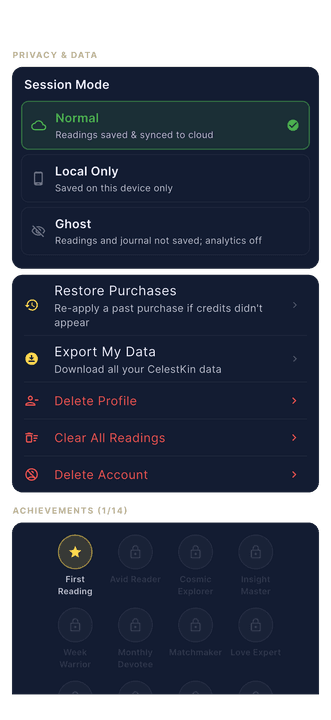
Export My Data is the CelestKin button that downloads the data your account holds as one ZIP of JSON files. Tap the gear icon at the top right, scroll to Privacy & Data, tap Export My Data, then Download My Data, and the ZIP opens in your phone's share sheet, ready to save or send.
Data portability is a right, not a support ticket. You should never have to email anyone, wait three business days, or explain yourself to download your own birth data and readings. In CelestKin the export is a button, it works for every account, and this is exactly what it does. CelestKin is a Canadian product, and Canada's federal privacy law, PIPEDA, says in its Principle 9 that on request an individual shall be given access to the personal information an organization holds about them. The button answers most of that request the moment you make it, and the README inside the ZIP names the few records we send on request instead.
The workflow
Tap the gear icon at the top right, scroll to Privacy & Data, and tap Export My Data. One more tap on Download My Data and the server gathers every table keyed to your account, zips it, and hands the file to your phone's share sheet. Save it to Files, Drive, email, wherever you like. The file is named celestkin_export_<timestamp>.zip, and it is yours.
What is inside the export ZIP?
The export ZIP holds one JSON file per table, plus a README. The tables cover your profile, every birth profile you have added, all readings, your chat conversations, purchases, credit history, notification preferences, journal entries, streaks, badges, and the audit trail of any deletion requests you have made. JSON because your data should be machine-readable and future-proof, not trapped in a format only we can open. That is also what the EU's data-protection working party asks for in its guidelines on the right to data portability (WP242): a structured, commonly used and machine-readable format, with XML, JSON and CSV given as examples. JSON itself is an open, language-independent text format defined in RFC 8259, so any text editor can open the files.
The export does not depend on a hand-typed list of tables. It asks the database for every table keyed to your user id, the same lookup the deletion sweep uses, so a table added next month lands in your next export without anyone remembering to add it. A short denylist leaves out admin tables and public catalogs, such as the seasonal-pack list. Chat messages belong to a conversation rather than directly to your user id, so the export collects them through your own conversations.
Two details we are deliberate about. First, what we encrypt on our servers exports decrypted, because a portability export you cannot read is not portability. That covers the text of each reading the app saves to your account and the text of each chat message. Not everything is encrypted to begin with: the question saved with a reading and the names, birth date and place saved beside it, readings saved from this website, your birth profiles, the results our server keeps for the Aura, Feng Shui, Muhurat, Sade Sati, Upcoming Clashes and Vaastu tools, a chat thread's title, running summary and list of remembered facts, and the first 120 characters of each message you send in chat (and of a reply saved after you left before it finished) are stored as plain text, and they export as they are. Second, we leave out a short, named list of fields: store purchase credentials that could be replayed, a device fingerprint, and the network addresses we record for security.
The list is exact: the Google Play purchase token, the Apple receipt, a device hash, three IP-address fields (such as the address a deletion request came from), the hash of an IP address on a waitlist sign-up, and, on a tester record, the address of the staff member who added it. Every other column in the rows you receive is exported, and the README names each field it removed.
A few records are kept against an email address rather than your account. A waitlist sign-up or a tester record goes into the ZIP when you sign in with Google or Apple, which confirm that the address is yours; otherwise it is available on request. Your email unsubscribe status, the log of email we sent to your address, messages from our support outbox, the history of changes to a tester record, and a partner program application are not in the ZIP, and neither are a few smaller records, such as the log of actions our staff took on your account. The README lists each of them under “Available on request”, and a message to [email protected] (from the address in question, for a record kept against one) gets them to you.
The export is rate limited to three per 24 hours, which is enough to check on us as often as you like while keeping the endpoint boring for abusers.
Start with the README
README.txt is the file to open first. It records when the export was generated (in UTC), the total number of records, every JSON file with its count, every field the export removed, and every record available on request. Someone with two birth profiles and 31 saved readings would see lines such as birth_profiles.json — 2 record(s) and readings.json — 31 record(s). A table with nothing in it still appears, as an empty array [], so you never have to guess whether a file is missing or empty. Dates are written in ISO 8601, in UTC. The README also names the rights the file serves: GDPR Article 15 (access), Article 17 (erasure) and Article 20 (portability).
Two failure cases are handled on purpose. If one table cannot be read while the archive is built, the ZIP carries a file named after that table and ending in .ERROR.txt instead of quietly leaving it out, so you can see what is missing and ask us for it. And if a single reading cannot be decrypted, that reading is exported in its encrypted form rather than failing the whole download.
The limits are real numbers. Each table is read in pages of 1,000 rows until it runs out, with a safety cap at roughly 50,000 rows per table. The app waits up to 60 seconds for the server to build the archive. And the three-per-24-hours allowance is shared with Import, so an export and an import in the same account on the same day use two of the three. Hit the limit and the app says so plainly: try again in 24 hours.
And once you have the file
The same archive can be imported into another CelestKin account: your birth profiles and readings merge in, duplicates are skipped. That round trip has its own article. And if what you actually want is to leave, the deletion levers sit in the same settings section and are covered in Every Delete Button, Explained. Questions about any of it reach a human at [email protected].
Run an export and check our work
Export My Data sits under Privacy & Data behind the gear icon, and its README lists each file in the archive with its record count.

Get a weekly dose of multi-tradition astrology
One email per week. Psychology-informed reflections, not horoscope fluff. Unsubscribe anytime.
By subscribing you agree to our privacy policy. Unsubscribe any time.