We audited every privacy switch in the app. Then we deleted the ones that lied.
CelestKin's privacy controls are the session-mode picker, the notification switches, and the export and delete buttons, all on the settings screen behind the gear icon. After an audit of the code behind every toggle, the four switches that controlled nothing are gone from the app, and this page says what each remaining control does, including what Ghost does not stop.
Most apps accumulate settings the way attics accumulate boxes: a switch gets added, the feature behind it changes, and one day the switch controls nothing. We ran a line-by-line engineering audit of every privacy-related control in CelestKin, tracing each toggle from the button you tap to the exact code that obeys it. This article is the result, including the embarrassing parts.
What the audit found, honestly
Two notification switches (retrograde alerts and festival greetings) were connected to nothing: no code read them, no such notification existed. Two more promised daily and weekly digests that were never generated. And our Ghost session mode, which promises the most, wasn't silencing analytics the way it claimed.
We did not quietly fix the descriptions to match the broken code. We deleted the four decorative switches outright, and wired Ghost mode into the app's own analytics events. Ghost still does not stop everything, and the section below lists what it leaves alone. A switch you can trust is worth ten switches that decorate a settings page.
How do Normal, Local Only and Ghost mode differ?
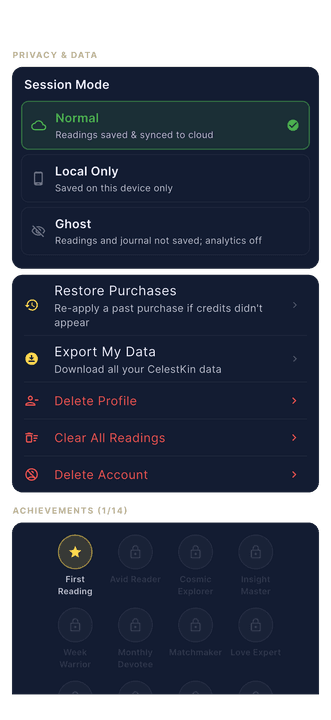
The three session modes differ in where a new reading is kept: Normal keeps it in your account, Local Only keeps it on this phone, and Ghost keeps it out of your history in both places (from app version 4.37.2 on the phone; see below). Normal is the default.
Normal: readings save to your account, with the text of each one encrypted on our servers, and sync across devices.
Local Only: readings stay on your device and are not added to your cloud history. From app version 4.37.2, Local Only never offers the Narrative, the piece that weaves your recent readings together after every fifth one, because it is built from your cloud history and saved back into it. In earlier versions Local Only could offer it, and opening it saved that Narrative to your account.
Ghost: a new reading is not added to your history, your journal pauses, and the app sends none of its own analytics events. From app version 4.37.2 the reading stays in the app's memory and is gone when you leave. In earlier versions it could be written to this phone's history the next time the app saved it, and the Aura, Sade Sati and Muhurat results the app keeps for you were saved on the phone as in any other mode.
Local Only and Ghost change more than where readings go. In both modes the activity diary stops logging, because the diary checks for either mode before it writes anything. Ghost goes further: journal saves are refused, and the check that stops the app's analytics events also stops the call that links analytics to your account.
Take one question, asked three ways. Ask about a job change in Normal, and the reading is saved on this phone and in your account, so it comes back when you sign in to the same account on another phone. Ask it in Local Only, and it sits in this phone's history and nowhere else. Ask it in Ghost on app version 4.37.2 or later, and the reading is kept only in the app's memory: it is not saved on this phone or added to your history in your account, and the app sends no analytics event about it. Our server still keeps its billing record of the credits the reading used.
Switching modes is not retroactive. The picker records your choice for the readings that come next, so anything saved while you were in Normal stays in your account after you move to Ghost. To remove that history, use Clear All Readings, or delete the profile the readings belong to.
One boundary we will not blur: Ask the Stars needs our servers to generate a reply even in Ghost mode, and those conversations are linked to your account until you delete them. Making chats fully ephemeral server-side is on our roadmap; until it ships, we say so here rather than let the word Ghost imply it.
Chats are not the only thing Ghost leaves alone. The analytics library in the app sends an automatic session event of its own. From app version 4.37.2 the app starts that library without it when the app opens in Ghost, but if you switch to Ghost while the app is open, the session event continues until the app is closed and opened again; earlier versions send it in every session, and also send the details on your account's analytics profile, such as your sign-in method, when you sign in. Versions before 4.37.2 also do not tell our server about Ghost, so the server's own analytics events, such as a partial refund or a referral claim, still go out. A refund that Google Play issues is recorded in our analytics under your account ID in any mode, because that notice comes from the store, not the app. The Aura, Feng Shui, Muhurat, Sade Sati, Upcoming Clashes and Vaastu tools keep their result on our server under your account in every mode, so the same answer can be shown again, and up to version 4.37.2 Colors of the Day keeps today's colours on this phone in every mode too.
Encrypted at rest has a specific meaning here. On our servers the text of each reading the app saves is sealed with AES-256 in Galois/Counter Mode, the authenticated cipher mode NIST specifies in SP 800-38D, under a key that belongs to your account alone: the server derives it from your user id with HMAC-SHA256, the construction defined in RFC 2104. The question saved with a reading, and the name, birth date and place saved beside it, are stored without that seal, and so are readings saved from our website. On the phone, Normal and Local Only readings sit in the operating system's secure storage rather than in a plain file.
The switches that remain all pull real levers
Transit alerts is the master switch for daily pushes: briefings, recaps, affirmations, even our occasional win-back message all check it server-side before sending, and the settings copy now says so plainly.
Weekly summary gates the Sunday overview on both the device and the server.
Rare cosmic windows is off by default and stays silent until you opt in.
Can I delete my data if I never made an account?
Yes. Deletion works for everyone, including accountless guests: export offer first, then a hard server-side sweep on the schedule in our Privacy Policy. Our deletion machinery is covered by its own automated test suite, and it runs against every table that stores your data under your account. A few records kept against your email address, or as our own records, outlive it; the privacy policy names each one. No ads, no data sales, no dark patterns on the way out.
Google Play requires any app that lets people create an account to provide an in-app path to delete that account and its data. Our Delete Account flow is that path, and a guest reaches it the same way a signed-in user does. A guest skips the identity check, because holding the guest session on the phone is the only proof a guest account has.
We will re-run this audit whenever the settings surface changes. If a switch is on that page, it works; if it stops working, it comes off the page.
Pick a mode before your next question
The session picker behind the gear icon sets where your next reading goes: your account, this phone only, or nowhere once you leave.

Get a weekly dose of multi-tradition astrology
One email per week. Psychology-informed reflections, not horoscope fluff. Unsubscribe anytime.
By subscribing you agree to our privacy policy. Unsubscribe any time.