Every delete button, explained: a chat, a profile, your readings, or everything
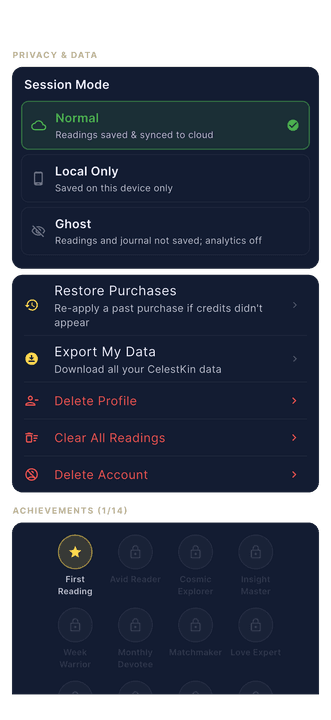
Deletion in CelestKin is four separate buttons, and each one removes data on the server rather than hiding it: delete a chat to scrub that conversation, Delete Profile to remove one person's birth details and readings, Clear All Readings to wipe your saved history, and Delete Account to erase your account and the data kept under it after a 30-day grace period, or at once. A short list of records kept against your email address, or as our own records, outlives the account, and the privacy policy names each one.
Deletion should come in sizes. Sometimes one conversation went somewhere too personal; sometimes a birth profile belongs to someone who asked you to remove it; sometimes you want the whole history gone but the account kept. CelestKin has a separate lever for each, and none of them are hidden behind support email. Here is each one, with what actually happens underneath.
Delete one chat
Every conversation in your chat list carries its own delete control, and both the bin icon and the swipe gesture ask for the same confirmation, so one stray swipe never destroys anything. Confirm, and the server does not just hide the thread: it overwrites the message content, the preview text, the title, and the summary, and drops any image references. Photos you attach in chat were already never stored; deletion removes the conversation text too. What remains is an empty archived shell with no words in it: ids and timestamps, kept for abuse and audit checks. The scrub also clears the context a chat carries when you open it from a reading, which can hold up to 4,000 characters of that reading's text.
Delete one birth profile
You can hold charts for family and friends, which means you hold data about people who can change their minds. Delete Profile lists every profile on the account; the list scrolls, so the eighteenth profile is as deletable as the first. Removing one takes its birth details and every reading generated for it, from the device and from your cloud history. If you delete the profile you were actively using, the app hands everything (chat, dashboard, charts) to your next profile instead of pointing at a ghost.
Can I wipe my readings but keep the account?
Yes. Clear All Readings, in the same section, is the middle size: keep the account, keep the profiles, erase the history. One confirmation wipes every saved reading across all profiles. Useful before lending your phone, or when you want the archive to start from today.
The wipe covers the copy on this phone and every row in your account's readings table. Birth profiles, chats, credits and settings are untouched, so every chart is still there the next time you ask a question; only the saved answers are gone.
What happens when I delete my account?
By default the account is scheduled for deletion 30 days out, and a server-side sweep erases it once those days are up; tick Delete immediately and the sweep runs at once.
We rebuilt this flow to be three steps, not a maze: see exactly what will be deleted (with a one-tap export link if you want your data first), verify it is really you, then hold the red button for three seconds. That hold is the confirmation; there is no word to type and no second submit button. Guests skip verification entirely, since possessing the session is the proof. Signed-in accounts verify with their password or provider, and people who sign in by email link get a 6-digit code by email. Deletion runs as a server-side sweep across every table that stores data under your account id, apart from the short list of records mentioned above, on the schedule published in our Privacy Policy. The sweep is covered by its own automated tests, and it works for accountless guest sessions exactly as it does for signed-in users. No retention tricks, no seven-screen cancellation maze.
During the 30 days your data stays hidden, and signing back in to an account with an email address or a sign-in provider lets you cancel; the screen shows the exact date before you confirm. A guest session is different: deleting signs it out, and it has no email or password to sign back in with, so a guest cannot cancel once the deletion is confirmed. The data is erased when the 30 days are up, or at once if you chose Delete immediately. Accounts with an email address get a message when the deletion is scheduled and another if it is cancelled. Choosing Delete immediately adds one question, "Are you sure?", because there is no undo for that path. Identity checks also expire: a signed-in account must have verified within the last five minutes, or the app asks again.
Two details catch people out. A paid subscription is a contract with the app store, not with us, so cancel it in your store settings as well: deleting the account ends its benefits, not the store's billing. And if you use a screen reader, the three-second hold is replaced by a regular Delete button with a confirmation dialog, because a timed hold is hard to perform with assistive navigation.
Google Play requires any app that lets people create an account to offer an in-app path to delete the account and its associated data. The flow above is that path, reachable without writing to anyone.
The principle
A delete button is a promise about the server, not about the screen. Each of these four removes data at the source, not just from view, and each pairs with the export so you never have to choose between keeping your history and exercising your rights. If any of them ever behaves differently than described here, tell us at [email protected] and we will fix the code or fix this article, whichever is lying.
CelestKin is a Canadian product, and Canada's federal privacy law, PIPEDA, states in clause 4.5.3 that personal information no longer needed for its purpose "should be destroyed, erased, or made anonymous." The four buttons are how you tell us a piece of your data is no longer needed, at the moment you decide it.
Three delete buttons, one settings section
Delete Profile, Clear All Readings and Delete Account sit together under Privacy & Data behind the gear icon, beside Export My Data.

Get a weekly dose of multi-tradition astrology
One email per week. Psychology-informed reflections, not horoscope fluff. Unsubscribe anytime.
By subscribing you agree to our privacy policy. Unsubscribe any time.